IA & Agentes
Copilot Studio do zero [5] - De 40% a 90%: consertando o agente com Evaluation
Copilot Studio from scratch [5] - From 40% to 90%: fixing the agent with Evaluation
![Copilot Studio do zero [5] - De 40% a 90%: consertando o agente com Evaluation](/images/copilot-dataday-90-capa.png)
Fala dataholics! Chegou a hora de fechar a introdução básica de Copilot Studio do zero, essa é a parte 5. No post anterior eu rodei o Evaluation no DataDay e ele tirou 40%. Prometi que ia consertar e provar a melhora no número. Pois é: cheguei a 90%, e o melhor, sem trocar o modelo de IA nem reescrever o agente do zero.
Mudei 3 coisas no total, entre o agente e a forma de testar. Bora ver o que move o ponteiro de verdade.
O que veremos nesse post:
A jornada em números: de 40% a 90% (não foi linear)
Alavanca 1: a tool de data (resolver "esta semana", "próximo")
Alavanca 2: desligar o Web Search
Alavanca 3: ajustar o set de perguntas (um teste honesto)
O resultado e o 1 Fail que sobrou
A lição de ouro
Resumo
A jornada em números
Antes de tudo, um detalhe que eu curto demais do Evaluation: cada rodada fica salva em Recent results, então dá pra ver a evolução ao longo do tempo. E olha que honesto o meu histórico:
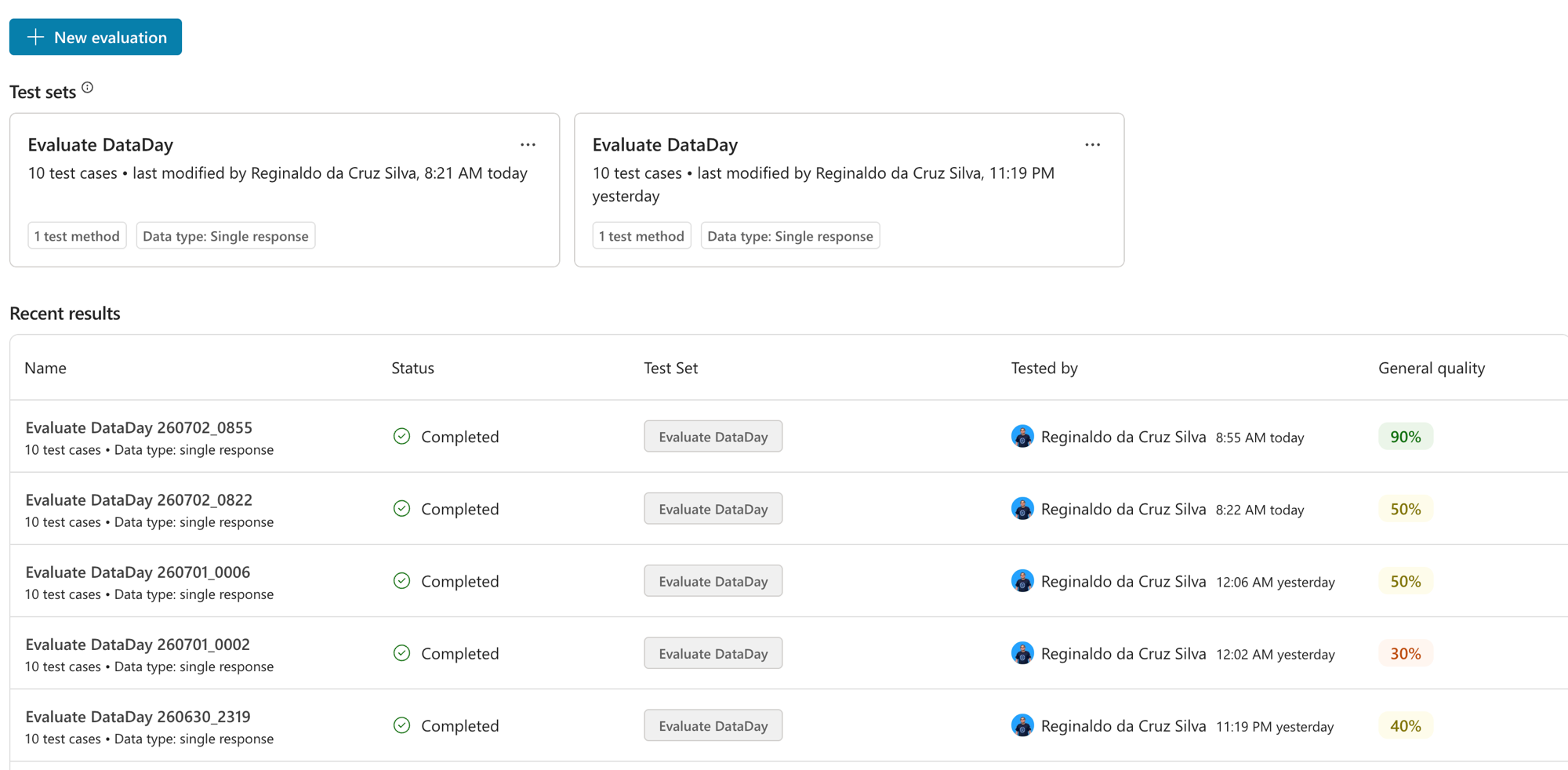
Repara que não foi uma linha reta: comecei em 40%, uma tentativa até me deu 30% (piorei!), depois 50%, 50% e finalmente 90%. Isso é o normal de ajustar agente: você muda uma coisa, mede, às vezes regride, entende o porquê e ajusta de novo. Sem o Evaluation salvo, eu estaria adivinhando se melhorei ou piorei. Com ele, cada mudança tem um número do lado.
Um bônus: dá pra usar o Compare with pra colocar duas execuções lado a lado e ver exatamente qual pergunta virou de Fail pra Pass. É o seu diff de qualidade.
Alavanca 1: a tool de data
Lembra que no post 4 os Fails eram perguntas com tempo relativo? "eventos desta semana", "próximo Culture on the Road". O agente não sabia nem que dia era hoje. A solução foi criar um Agent flow simples, que eu chamei de diaatual, com uma única missão: retornar a data de hoje.
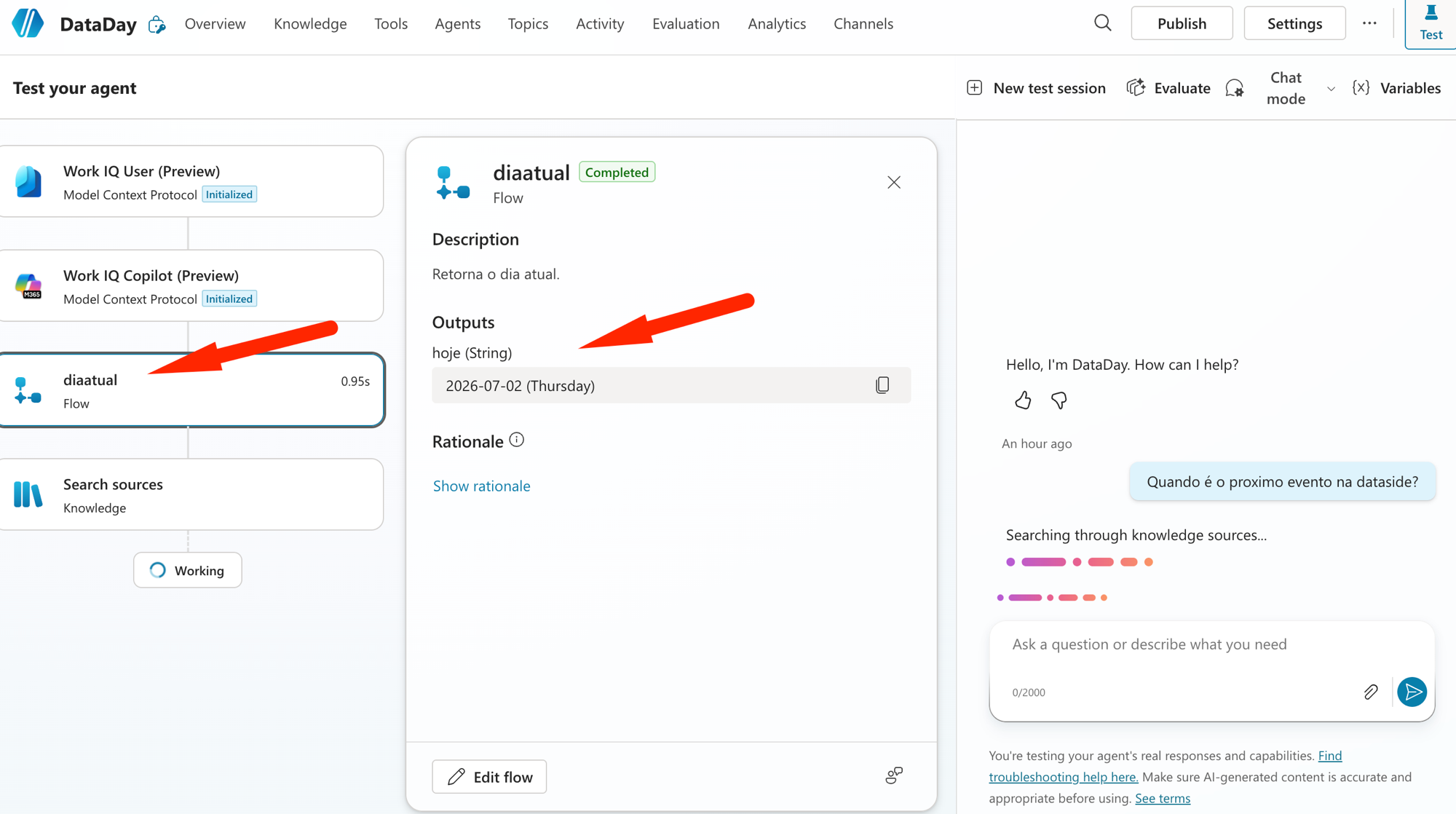
O segredo está na expressão. A função que retorna a data não aparece buscando "today", o nome dela é utcNow(). E como ela devolve em UTC, eu converto pro fuso do Brasil pra não errar o dia:
convertFromUtc(utcNow(), 'E. South America Standard Time', 'yyyy-MM-dd')No print, o output hoje voltou certinho: 2026-07-02 (Thursday). Agora, sempre que alguém pergunta algo com "hoje", "esta semana" ou "próximo", o agente chama essa tool primeiro e passa a raciocinar a partir da data real.
Reginaldo, e o agente sabe QUANDO chamar a tool?
Só se você mandar. Eu deixei explícito nas Instructions: "para qualquer pergunta com tempo relativo, chame a tool de data antes de responder". Sem essa regra, ele às vezes nem aciona a ferramenta.
Alavanca 2: desligar o Web Search
No post 3 eu já tinha percebido o Web Search se intrometendo, trazendo "eventos do Rio" de sites públicos no meio das respostas. Para um agente que responde sobre o SEU calendário, isso é ruído puro (e risco de data errada).
A correção é um clique: no bloco Knowledge, Web Search: Disabled. E não é só estética: com a web fora do caminho, o agente para de dividir a atenção com a internet e foca na fonte oficial, o que ajudou bastante na recuperação dos eventos internos.
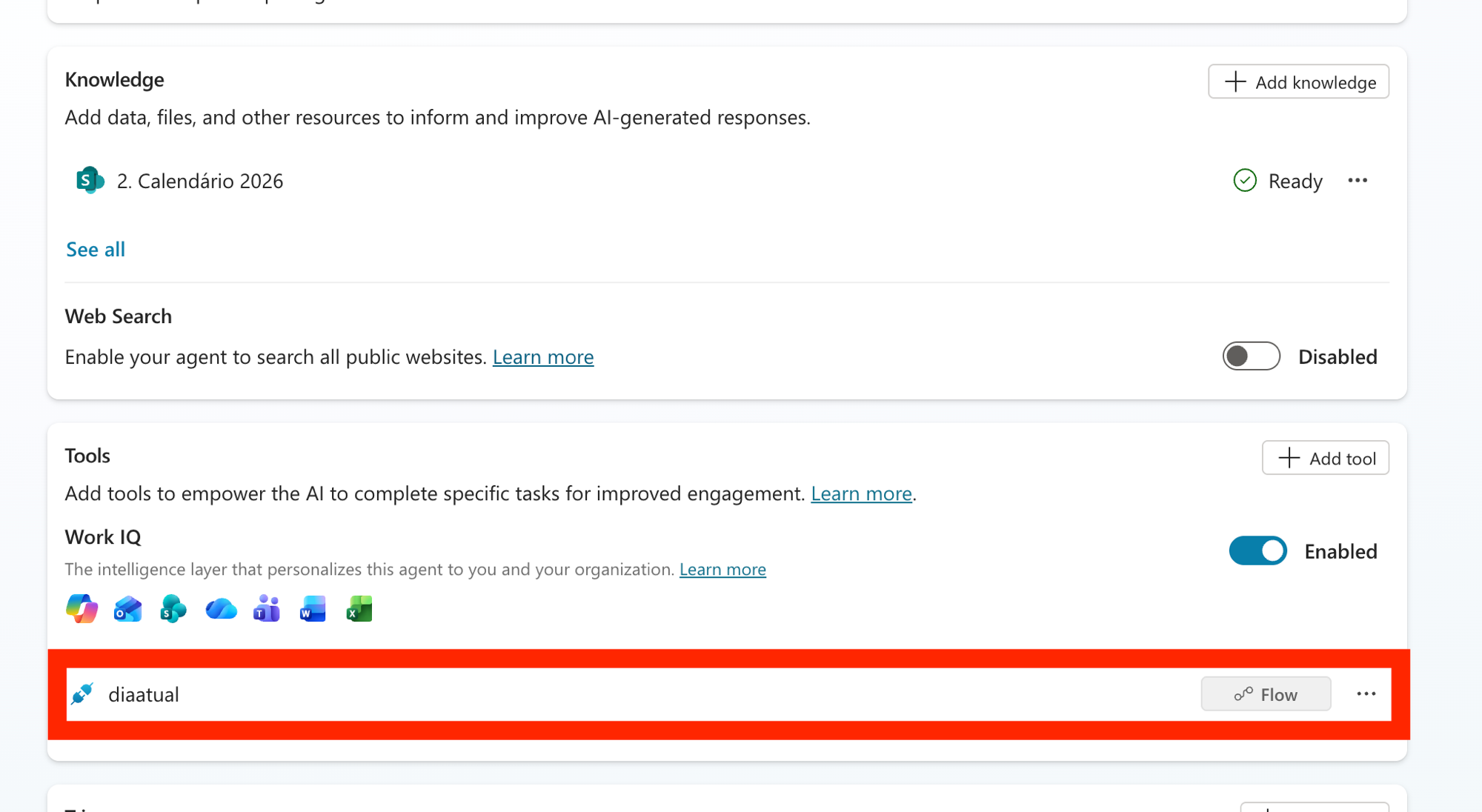
Nesse print de configuração dá pra ver o combo montado: o Knowledge do calendário (o mesmo Excel de sempre, eu não troquei a fonte) marcado como Ready, o Web Search Disabled e, nas Tools, o Work IQ ligado junto com a tool diaatual.
Alavanca 3: ajustar o set de perguntas (um teste honesto)
Essa alavanca é sobre o TESTE, não sobre o agente, e faz toda a diferença. Lembra que no post 4 eu deixei o Quick question set gerar as 10 perguntas automaticamente? Parte daquele 40% veio de perguntas que nem batiam com os dados do calendário: o agente ia falhar de qualquer jeito porque perguntavam coisa que não existe na planilha.
Então eu revisei o test set e troquei por perguntas reais e coerentes com o calendário, do jeito que um funcionário perguntaria de verdade: feriados, Festa Junina, próximo Culture on the Road, eventos do mês, Encontro de Mentores em setembro. Perguntas que têm resposta no dado.
Reginaldo, mas isso não é maquiar o resultado?
Pelo contrário. Um teste com perguntas fora do escopo do agente te dá um número injusto, baixo demais. Perguntas que refletem o uso real medem a qualidade que o usuário vai sentir. Avaliar bem é tão importante quanto construir bem.
O resultado: 90% (e o Fail que sobrou)
Olha, rodei o mesmo test set (as 10 perguntas curadas, coerentes com o calendário) e o número saltou:
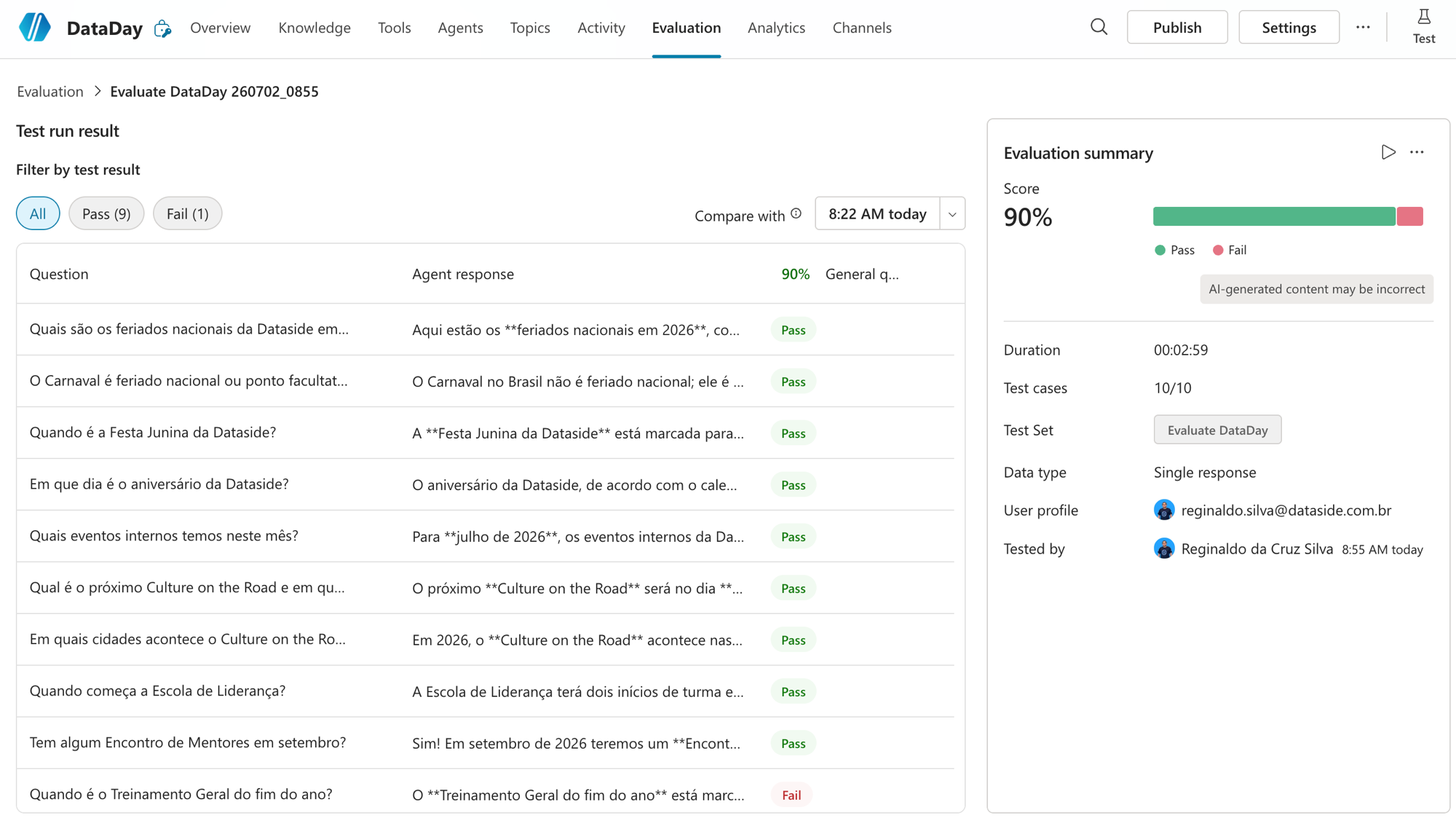
9 Pass, 1 Fail, 90%. As perguntas que antes davam "Not answered" (eventos do mês, próximo Culture on the Road, Mentores em setembro) agora passam com data e tudo. O juiz confirma: "All quality checks passed, resposta no tema, útil e embasada nos documentos".
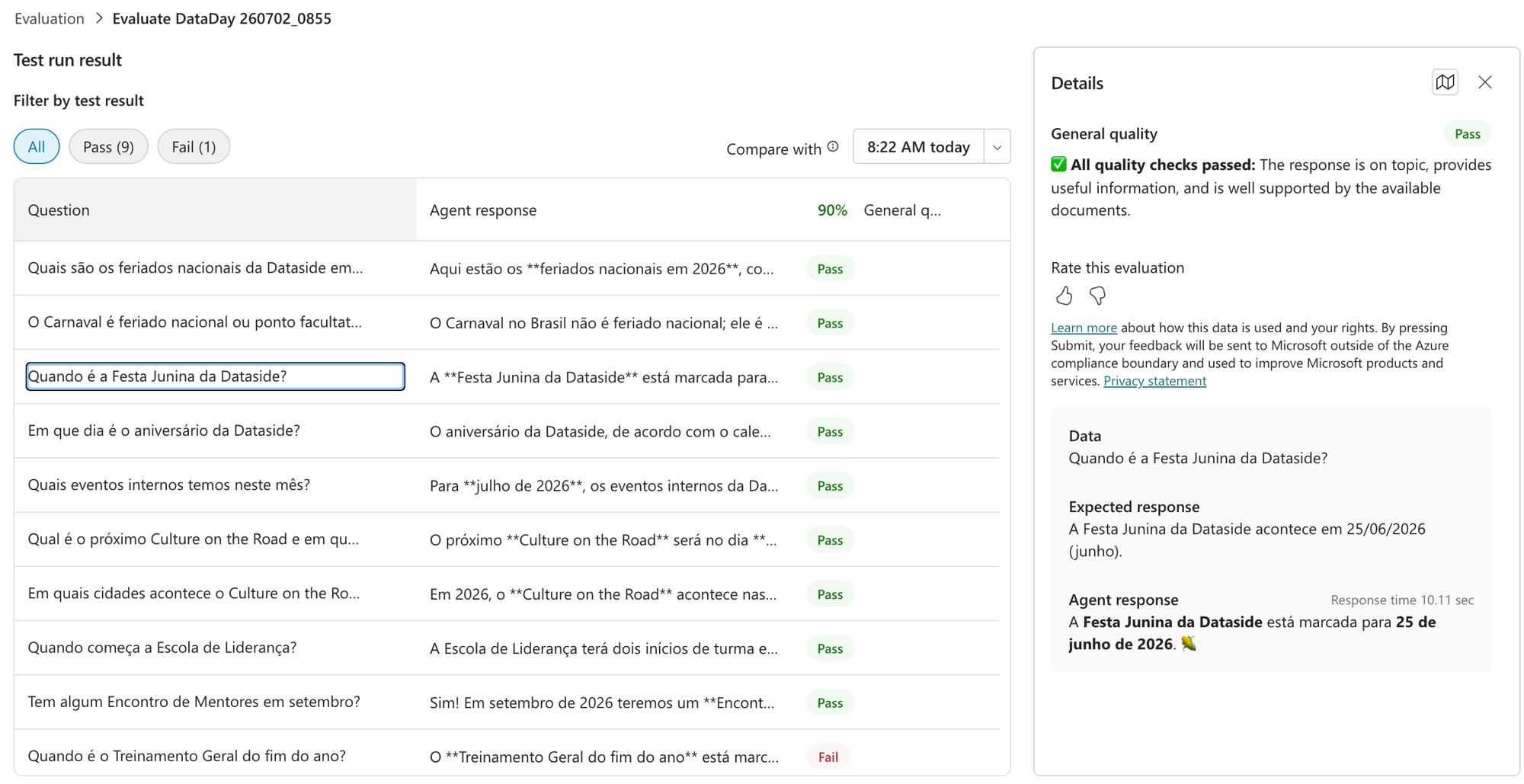
E o 1 Fail que sobrou? Foi o "Quando é o Treinamento Geral do fim do ano?". A resposta certa era 25/11/2026 (o Treinamento Geral do segundo semestre), mas o agente respondeu, confiante, que estava marcado para 25 de dezembro, que no calendário é o Natal, não Treinamento Geral. Ou seja, ele trocou a data e ainda deu um check de certeza numa resposta errada. Serve de lembrete: 90% não é 100%, e tá tudo bem. O objetivo é subir a qualidade de forma medida, não perseguir nota cheia num teste sintético.
A lição de ouro
Se você levar uma coisa desse post, leve essa: dá pra melhorar muito sem trocar o modelo nem reescrever o agente. Uma tool certa (data), desligar o que atrapalha (Web Search) e um teste honesto (perguntas reais) levaram o DataDay de 40% a 90%. Foi ajuste de configuração e de avaliação, não de modelo.
E a segunda lição: metade da qualidade está em como você mede. Perguntas geradas automaticamente são ótimas pra começar, mas podem te dar um número injusto. Cure o seu test set com perguntas reais e o score passa a refletir o que o usuário vive.
No fim, o que deixa o agente bom é iterar: construir (post 3), medir (post 4) e voltar a medir depois de melhorar (esse post). O Evaluation é o que transforma "acho que melhorei" em "melhorei de 40% pra 90%".
RESUMO
Saí de 40% pra 90% sem trocar o modelo de IA, só com ajustes de tool, configuração e teste.
Tool de data (Agent flow com utcNow + convertFromUtc): resolve "hoje / esta semana / próximo". Peça nas Instructions pra ele chamar a tool.
Web Search desligado: tira o ruído da internet e ajuda o agente a focar na fonte interna.
Set de perguntas curado: troquei as perguntas geradas automaticamente por perguntas reais e coerentes com o calendário. Avaliar bem importa tanto quanto construir bem.
A jornada não é linear (cheguei a regredir pra 30%); use o histórico e o Compare with pra guiar os ajustes.
Sobrou 1 Fail: o agente respondeu 25 de dezembro (que é o Natal) numa data que era 25 de novembro. 90% não é 100%, e está ótimo.
Lição de ouro: dá pra ir de 40% a 90% com tool + configuração + teste honesto, sem trocar o modelo.
E com isso a gente fecha a introdução básica da série: você já sabe onde o Copilot Studio vive, do que um agente é feito, como criar um do zero, como avaliar e como melhorar de forma medida. Daqui pra frente a gente vai mais fundo: SharePoint a fundo, conectar o Databricks, orquestração e mais.
Referências:
https://learn.microsoft.com/en-us/microsoft-copilot-studio/analytics-agent-evaluation-overview
https://learn.microsoft.com/en-us/microsoft-copilot-studio/knowledge-copilot-studio
Fique bem e até a próxima.
#copilotstudio #microsoftai #evaluation #rag #agentes #ia #powerplatform #datainaction
Hey dataholics! Time to wrap up the basic introduction of Copilot Studio from scratch, this is part 5. In the previous post I ran Evaluation on DataDay and it scored 40%. I promised I'd fix it and prove the improvement in the number. Well: I got to 90%, and the best part, without swapping the AI model or rewriting the agent from scratch.
I changed 3 things in total, across the agent and the way I test it. Let's see what really moves the needle.
What we'll cover in this post:
The journey in numbers: from 40% to 90% (it wasn't linear)
Lever 1: the date tool (solving "this week", "next")
Lever 2: turning off Web Search
Lever 3: fixing the question set (an honest test)
The result and the 1 Fail that remained
The golden lesson
Recap
The journey in numbers
First things first, a detail I really dig about Evaluation: each run gets saved under Recent results, so you can see the progress over time. And look how honest my history is:
Notice that it wasn't a straight line: I started at 40%, one attempt even gave me 30% (I made it worse!), then 50%, 50% and finally 90%. That's normal when tuning an agent: you change one thing, measure, sometimes regress, understand why, and adjust again. Without Evaluation saved, I'd be guessing whether I improved or got worse. With it, every change has a number next to it.
A bonus: you can use Compare with to put two runs side by side and see exactly which question flipped from Fail to Pass. It's your quality diff.
Lever 1: the date tool
Remember that in post 4 the Fails were questions with relative time? "events this week", "next Culture on the Road". The agent didn't even know what day it was today. The solution was to create a simple Agent flow, which I called diaatual, with a single mission: return today's date.
The trick is in the expression. The function that returns the date doesn't show up when you search for "today", its name is utcNow(). And since it returns in UTC, I convert it to Brazil's time zone so I don't get the day wrong:
convertFromUtc(utcNow(), 'E. South America Standard Time', 'yyyy-MM-dd')In the screenshot, the today output came back correctly: 2026-07-02 (Thursday). Now, whenever someone asks something with "today", "this week" or "next", the agent calls this tool first and starts reasoning from the real date.
Reginaldo, does the agent know WHEN to call the tool?
Only if you tell it to. I made it explicit in the Instructions: "for any question with relative time, call the date tool before answering". Without that rule, it sometimes doesn't even trigger the tool.
Lever 2: turning off Web Search
Back in post 3 I had already noticed Web Search butting in, pulling "events in Rio" from public sites into the middle of the answers. For an agent that answers about YOUR calendar, that's pure noise (and a risk of wrong data).
The fix is one click: in the Knowledge block, Web Search: Disabled. And it's not just cosmetic: with the web out of the way, the agent stops splitting its attention with the internet and focuses on the official source, which helped a lot with recovering the internal events.
In this configuration screenshot you can see the combo I put together: the calendar Knowledge (the same Excel as always, I didn't change the source) marked as Ready, Web Search Disabled and, under Tools, Work IQ enabled alongside the diaatual tool.
Lever 3: fixing the question set (an honest test)
This lever is about the TEST, not the agent, and it makes all the difference. Remember that in post 4 I let the Quick question set generate the 10 questions automatically? Part of that 40% came from questions that didn't even match the data in the calendar: the agent was going to fail no matter what because they asked about things that don't exist in the spreadsheet.
So I reviewed the test set and swapped in real questions consistent with the calendar, the way an employee would actually ask: holidays, Festa Junina, next Culture on the Road, events of the month, Mentors Meeting in September. Questions that have an answer in the data.
Reginaldo, but isn't this just gaming the result?
Quite the opposite. A test with questions outside the agent's scope gives you an unfair number, way too low. Questions that reflect real usage measure the quality the user will actually feel. Evaluating well is as important as building well.
The result: 90% (and the Fail that remained)
Look, I ran the same test set (the 10 curated questions, consistent with the calendar) and the number jumped:
9 Pass, 1 Fail, 90%. The questions that used to return "Not answered" (events of the month, next Culture on the Road, Mentors in September) now pass with dates and everything. The judge confirms: "All quality checks passed, on-topic answer, useful and grounded in the documents".
And the 1 Fail that remained? It was "When is the end-of-year General Training?". The correct answer was 11/25/2026 (the second-semester General Training), but the agent confidently replied it was set for December 25th, which in the calendar is Christmas, not General Training. In other words, it got the date wrong and even slapped a confident check mark on a wrong answer. It serves as a reminder: 90% is not 100%, and that's fine. The goal is to raise quality in a measured way, not to chase a perfect score on a synthetic test.
The golden lesson
If you take one thing from this post, take this: you can improve a lot without swapping the model or rewriting the agent. The right tool (date), turning off what gets in the way (Web Search) and an honest test (real questions) took DataDay from 40% to 90%. It was configuration and evaluation tuning, not a model change.
And the second lesson: half of the quality is in how you measure. Automatically generated questions are great to start with, but they can give you an unfair number. Curate your test set with real questions and the score starts reflecting what the user actually experiences.
In the end, what makes an agent good is iterating: build (post 3), measure (post 4) and measure again after improving (this post). Evaluation is what turns "I think I improved" into "I improved from 40% to 90%".
RECAP
I went from 40% to 90% without swapping the AI model, just with tool, configuration and test tweaks.
Date tool (Agent flow with utcNow + convertFromUtc): solves "today / this week / next". Ask it in the Instructions to call the tool.
Web Search off: removes the internet noise and helps the agent focus on the internal source.
Curated question set: I swapped the automatically generated questions for real ones consistent with the calendar. Evaluating well matters as much as building well.
The journey isn't linear (I even regressed to 30%); use the history and Compare with to guide the tweaks.
1 Fail remained: the agent answered December 25th (which is Christmas) for a date that was November 25th. 90% is not 100%, and that's great.
Golden lesson: you can go from 40% to 90% with tool + configuration + an honest test, without swapping the model.
And with that we close the basic introduction of the series: you now know where Copilot Studio lives, what an agent is made of, how to create one from scratch, how to evaluate it and how to improve it in a measured way. From here on we go deeper: SharePoint in depth, connecting Databricks, orchestration and more.
References:
https://learn.microsoft.com/en-us/microsoft-copilot-studio/analytics-agent-evaluation-overview
https://learn.microsoft.com/en-us/microsoft-copilot-studio/knowledge-copilot-studio
Stay well and see you next time.
#copilotstudio #microsoftai #evaluation #rag #agents #ai #powerplatform #datainaction
Gostou? Tem mais no YouTube e no LinkedIn.
Enjoyed it? There's more on YouTube and LinkedIn.
Continue lendo Keep reading
![GitHub Copilot a fundo [5] - AI Credits: o Copilot virou usage-based](/images/ghcopilot-aicredits-capa.png)
GitHub Copilot a fundo [5] - AI Credits: o Copilot virou usage-based
Ler → Read →![GitHub Copilot a fundo [4] - Copilot CLI: o agente que mora no seu terminal](/images/ghcopilot-cli-capa.png)
GitHub Copilot a fundo [4] - Copilot CLI: o agente que mora no seu terminal
Ler → Read →![GitHub Copilot a fundo [3] - MCP: ferramentas para o agente sem perder a governança](/images/ghcopilot-mcp-capa.png)